Saving and sharing#
Everything you make in RPG Tsukuru GB lives in the cartridge's battery memory, and so do the player's three saved games. This page says what the cartridge keeps and how it checks it, how the three play saves work, and the two ways a game leaves the cartridge: the link cable to a second Game Boy Color, and ASCII's Turbo File GB. It describes what you see; the byte layouts are on How it works.
What the cartridge keeps#
The cartridge has 32 KB of battery-backed memory, and in it one game (the one you are making), three play saves and a few settings. There is no second project slot: to keep more than one game, use a Turbo File GB (below).
| Part | What it holds | Checked by a sum |
|---|---|---|
| The title page | The game's title (two lines of 8), your name, the title screen's picture and song | yes |
| Heroes | The eight heroes, and the start settings: the party, gold, the start place, the vehicles, the eight places' songs | yes |
| Maps | The 25 maps' names, floors and stairs, their room plans, and which world map the game uses | yes |
| Magic | The 40 spells | yes |
| Items | The 115 items | yes |
| Monsters | The 72 monsters | yes |
| Enemy Map | The troops of the world map's 40 areas and of every map's floors | yes |
| Messages | Every message, by map, and the common messages | no |
| Events | Every event, the world map's places, and which chests are in use | no |
| Three play saves | The player's progress, one slot each (DATA1–3) | yes, each |
| Settings | The user-game mode, and the slot last saved by each kind of game | yes |
| The signature | Six bytes that mark the cartridge as formatted | checked at power-on |
The sample game is not in that memory. NOBLE CAT sits in the ROM as a complete game of its own, and Sample サンプル on the title plays it straight from there. Sample Load サンプルロード in the editor copies it over your game, and each database page's S button copies one of its records (Getting started). So the sample can't be lost, whatever happens to the save.
The parts are kept apart, each with its own small check sum (a figure worked out from its bytes and stored beside them), except the messages and the events, which have none. When the program reads a part it works the figure out again; if it differs, the part is damaged.
When the cartridge is switched on#
At power-on the program looks at one thing only: a signature, six bytes that say the cartridge has been formatted.
- No signature (a new cartridge, or one whose battery has lost everything): the program formats it at once, without a word. It writes a blank project from the ROM, empties the play saves and the settings, and the ASCII logo and the title come up as usual. You will never know it happened, and there was nothing to lose.
- A signature: the title comes up, and nothing else is checked yet.
The cartridge studied for this guide came second-hand, and its save holds no game: its memory holds only the pattern of a chip never written (or one whose battery ran out), with no signature, so the program would format it at the first power-on, losing nothing.
The broken-data message#
A damaged part is noticed when it is read. That is when you start a game with Game ゲーム, or when the program otherwise needs that part. If the part's sum doesn't match, the screen says:
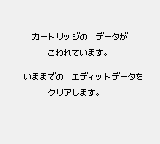
Pressing A erases everything: the whole game, all three play saves and the settings go back to the blank project, the same as a new cartridge, and you return to the title. The screen offers no other choice. The erasing happens on A, not before (read from the program): a cartridge switched off at the message still holds its data, which a cartridge reader can then copy off and a computer can repair.
The messages and the events carry no sum, so damage there is not caught: a changed byte in them was tried in an emulator, and the game played on without a message.
The play saves#
Three play saves (DATA1–3) are shared by everything the cartridge plays: your game (Game), the sample (Sample) and Test Play テストプレイ in the editor.
Saving#
The player saves from the command window: Status つよさ → Save セーブ する. It works anywhere on foot, on the world map and inside maps alike; in the ship or the airship the choice is gone. An event's save point offers the same three slots (Events); it doesn't heal.
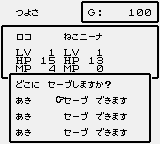
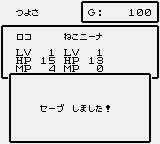
Each slot shows あき (empty) or a tag for the kind of game that wrote it, ユーザー (your game), サンプル (the sample) or テスト (test play), with the leader's name and level. A saves at once: there is no "overwrite?" question, then 「セーブ しました!」 ("saved!").
Continuing#
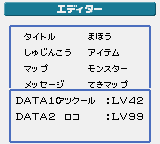
A game's opening offers Continue つづきから and From the Start はじめから. Continue lists only the saves of the same kind: Game shows the ユーザー saves, Sample the サンプル ones, Test Play the テスト ones. With none, it says 「データが ありません!」 ("there's no data!"); the opening's cursor starts on Continue only when there is a save to continue. Each kind of game also remembers the slot it last saved to, and the save list's cursor starts there.
What a play save keeps#
A play save keeps the player's progress, not the game. The rest is read from the cartridge's game each time the save is continued:
| Kept in the play save | Read from the game when it is continued |
|---|---|
| Which kind of game made it (your game, the sample, test play) | The database: spells, items' prices and values, monsters |
| Every hero's level, four stats, experience, maximum HP and MP, and name | Each hero's graphic and the levels the spells are learnt at |
| The party, in its order; each member's HP, MP, equipment and condition | The maps, their rooms and stairs; which world map |
| Switches 1–100, and which chests have been opened | Every event and message |
| Gold, and how many of each of the 115 items | The enemy map, and the songs of the BGM settings |
| Where the party stands (map, floor, room, spot), and where the ship and airship are | The title page |
| Which places on the world map have been visited, and whether battles are on | |
| The song playing, and the screen's tint |
So editing your game changes the saves made in it: a new message, a moved event, a stronger monster are there at once. A hero's level, stats and name, though, are in the save: a hero you rename in the editor keeps the old name in a save that was made before. The save puts the party back on the same map, floor, room and spot, whatever that room now holds.
A Game Over saves nothing. The game goes back to the title (or the game's opening, in the user-game mode) and the player continues from the last save.
Emptying a slot#
Clear Data データのクリア → Save Data セーブデータ empties one play save; All ぜんぶ empties everything. Each asks 「ほんとうに けしますか?」 ("really erase?") first (Getting started).
Sample Load and Clear Data#
Sample Load asks first, because it replaces your game:
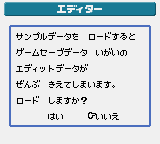
It copies the whole sample over every part of your game but the play saves and the settings, then says 「ロード しました!」 ("loaded!"). Your play saves stay, so a save of your old game is now continued against the sample's maps and events: empty those slots, or expect nonsense.
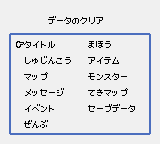
Clear Data puts back the blank project's version of one part, or of everything. Clearing one part leaves the others pointing into it: clear the messages, and the events still show messages by number, now empty. Clear parts together, or clear the events with them.
The user-game mode#
Settings せってい on the title holds one setting, the game start setting ゲームかいしのせってい: the user-game mode ユーザーゲームモード, off しない or on する.
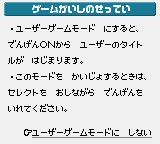
With it on, the cartridge powers on into your game's opening, past the cartridge's own title. B at that opening does nothing, a Game Over or the ending returns to it, and the soft reset (A + B + SELECT + START) comes back to it too. The cartridge behaves as your game. To turn it off, hold SELECT while you switch on, as the page itself says (「このモードを かいじょするときは、セレクトを おしながら でんげんを いれてください」).
The link cable#
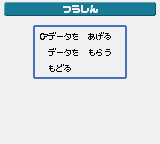
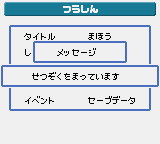
Link つうしん on the title sends one part of a game from one Game Boy Color to another over a link cable, both with an RPG Tsukuru GB cartridge. Its page has three entries: Give Data データを あげる, Receive Data データを もらう and Back もどる.
Sending a part#
- On the receiving console: Receive Data, then choose the kind you want from its list of ten. It then waits, 「せつぞくを まっています」 ("waiting for the connection"), as long as it takes; B gives up.
- On the giving console: Give Data. The giver doesn't choose: the receiver asks for the kind, and the giver sends it. It says 「データを そうしんちゅうです」 ("sending data") with the kind's name, and the receiver 「データを じゅしんちゅうです」 ("receiving data"). A small figure walks across the screen as the data goes.
- Both then show the result, and wait for A or B: 「データを じゅしんしました」 ("data received") and 「データを そうしんしました」 ("data sent"), or 「データじゅしんに しっぱいしました」 / 「データそうしんに しっぱいしました」 on a failure.
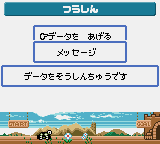
Start the receiver first. The giver tries a few times and then gives up with 「せつぞくできませんでした」 ("couldn't connect").
The receiving cartridge changes only when you press A or B on 「データを じゅしんしました」. Until then nothing is written, and on a failure nothing is. The data is checked with one sum over the whole part and its length, and nothing else: there is no test of which game it came from.
| Kind | On the list | What it carries | Time on the cable |
|---|---|---|---|
| Title | タイトル | The title page: the title, the author's name, the title screen's picture and song | a moment |
| Heroes | しゅじんこう | The eight heroes and the start settings | about half a second |
| Maps | マップ | The maps' names, floors, stairs and room plans, and the world-map choice | about 3 seconds |
| Messages | メッセージ | Every message | about 9 seconds |
| Events | イベント | Every event, the world map's places, the chests | about 6 seconds |
| Magic | まほう | The 40 spells | about half a second |
| Items | アイテム | The 115 items | about 1 second |
| Monsters | モンスター | The 72 monsters | about 2 seconds |
| Enemy Map | てきマップ | The troops | about 1 second |
| Save Data | セーブデータ | All three play saves | about 1 second |
The times are worked out from the program's pace (24 bytes a frame, after a second or so of handshake), not measured on hardware.
What a session moves#
One session moves one kind, and replaces it. The receiver's other parts, its settings and its signature stay as they were. So:
- A whole game is nine sessions (Title to Enemy Map), and the play saves are a tenth.
- Sending some kinds only can leave a mix of two games: a map whose events are the old game's, events that show the old game's messages by number. Send the parts that belong together (maps with events and the enemy map; events with messages).
- Save Data carries all three play saves at once, over the receiver's three.
The soft reset doesn't work on the Link page, so a session can't be cut short by the buttons.
The Turbo File GB#
ASCII's Turbo File GB is a battery-powered box that plugs into the link port. It holds 1 MB of its own, has a slot for a 1 MB memory card かくちょうメモリーカード, and a write-protect switch. It is the only way to keep more than one game, to keep a copy of yours, or to carry a game to another cartridge without a second console.
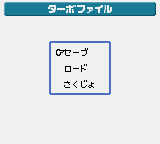
Turbo File ターボファイル on the title offers Save, Load and Delete セーブ / ロード / さくじょ. With a memory card in, each first asks which to use, the Turbo File itself or the card ターボファイル / かくちょうメモリーカード.
Save#
Save copies the whole cartridge into a new file: your game, the three play saves and the settings, all 32 KB. The program names the file itself, RPG TCOOL 00, 01 and so on, taking the lowest number not in use, and shows it with the space left (「あき 119ブロック」 on an empty device). START goes on, 「セーブ しますか?」 asks yes or no, and 「セーブしています」 ("saving") runs to 「しゅうりょうしました」 ("done").
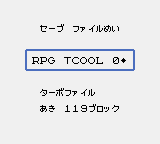
- A file is 4 blocks, and each side (the device, the card) has 120: room for 30 games a side. The free count it shows is one short (119 on an empty side), a slip the device's public description also notes.
- Each Save makes a new file. To replace an old copy, save the new one, then delete the old.
- A save took about 20 seconds in the emulator, whose model of the device answers at once; a real unit may take longer.
Load#
Load lists RPG Tsukuru GB's files 「ロードする ファイル」, with their names, and asks 「ロード しますか?」, with the cursor on いいえ (No). Yes copies the file over the cartridge.
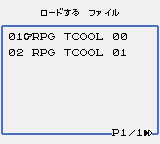
A load replaces everything on the cartridge: your game, all three play saves and the settings. Save your own game to the Turbo File first if you want to keep it.
Delete#
Delete lists the same files 「さくじょする ファイル」, asks 「さくじょ しますか?」, and frees the file's blocks (「さくじょしています」). The next save takes them.
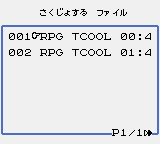
Only RPG Tsukuru GB's files are listed. Another game's files on the same device are invisible to it here, though they still take their blocks.
The protect switch and the batteries#
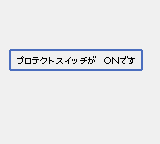
With the write-protect switch on, a save writes nothing and says 「プロテクトスイッチが ONです」 ("the protect switch is on"). With the batteries low, the pages blink TF BATTERY LOW and carry on.
| On screen | In English | Seen |
|---|---|---|
| しゅうりょうしました | Done. | in the emulator, after every save, load and delete |
| プロテクトスイッチが ONです | The protect switch is on. | in the emulator, a save with the switch on: nothing is written |
| TF BATTERY LOW | (blinks while the pages carry on) | in the emulator, with the batteries' bit cleared |
| つうしんエラーが はっせいしました | A communication error has occurred. | read from the program |
| ファイルが ありません | There are no files. | read from the program |
| あきバンクが たりません | There aren't enough free banks. | read from the program |
| かきこめませんでした | It couldn't be written. | read from the program |
| よみこめませんでした | It couldn't be read. | read from the program |
| でんちが なくなります | The batteries are running out. | read from the program |
| ファイルが こわれています | The file is broken. | read from the program |
| ターボファイルが いっぱいです | The Turbo File is full. | read from the program |
| かくちょうメモリーカードが いっぱいです | The memory card is full. | read from the program |
| けせませんでした | It couldn't be deleted. | read from the program |
Keeping a game safe#
- Keep a copy on a Turbo File GB, and save a new one after a good session; delete the oldest when the side is full.
- Mind the tags in the save list: test play and your game share the three slots.
- Don't press A on the broken-data message if the game matters: switch off and copy the save first (above).
- Send whole sets over the cable: maps with their events and enemy map, events with their messages.
- In an emulator, the save file is the cartridge's memory: 32 KB, copied aside as you would a Turbo File file.
Fan-made reference material, one of the Eschaton Games Tsukuru guides. Not affiliated with the publishers of the titles it covers. Corrections and questions: contact@eschaton.games.