Getting started#
Power-on#
Switched on, RPG Tsukuru GB shows three cards in turn, a few seconds each: the ASCII name, the アスキー ツクールシリーズ badge (ASCII's Tsukuru series), and the developer's logo, 空想科学 (Kuusou Kagaku) with its emblem. A short fanfare plays with the logos. The title comes up about fifteen seconds after power-on.

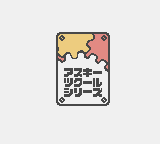
Before the logos, the program checks the save. It looks for a six-byte signature at the end of the save's first bank:
- No signature: the cartridge is taken for a new one and formatted at once, with no message. The blank project and three empty play saves are written, and the title comes up as usual. A new cartridge, one whose battery has run flat, and one whose save is damaged in exactly those six bytes all look the same to it.
- A signature: nothing else is checked yet. Each part of the save carries a checksum of its own, and a part is checked only when the program reads it, by the editors, by Game or by test play.
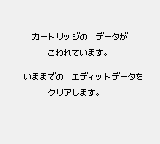
When a part fails its check, the program stops with 「カートリッジの データが こわれています。いままでの エディットデータを クリアします。」: "The cartridge's data is broken. The edit data so far will be cleared." There is no other choice: A formats the whole cartridge, play saves and settings too, and goes back to the title.
On a Game Boy or Game Boy Pocket the cartridge shows one screen, 「このカートリッジは ゲームボーイカラー 専用です。」 ("this cartridge is for the Game Boy Color only"), and stops. It is the only screen in the game written with kanji (Behind the scenes).
The title#
The title is a grid of six picture buttons, three over three, with the cursor on Game. The d-pad moves between them and A opens one.
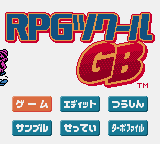 123456
- 1 Game ゲーム plays your game: its opening, then Continue or From the Start
- 2 Edit エディット the editor menu: the database, maps, messages, events and test play
- 3 Link つうしん gives or receives one part of a game over the link cable
- 4 Sample サンプル plays the sample game, NOBLE CAT, straight from the ROM
- 5 Settings せってい one setting: switch on straight into your game
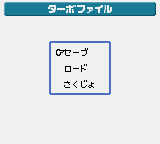
- 6 Turbo File ターボファイル saves, loads or deletes the whole cartridge on a Turbo File GB
Game#
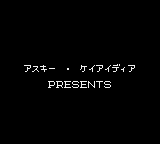
Game ゲーム plays your game, the one in the editors, from its own opening: your name with 「PRESENTS」, then the game's title over the picture you chose, then Continue つづきから or From the Start はじめから. On a blank cartridge the opening is a bare 「PRESENTS」, since the game has no title and no author yet. Playing a game follows it from there.

Sample#
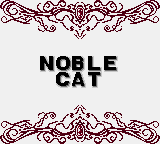
Sample サンプル plays the sample game, NOBLE CAT, credited to アスキー・ケイアイディア, straight from the ROM. Nothing you do in the editors changes it, and it can't be erased. Its saves are tagged サンプル in the play slots, and Continue in the sample lists only those (below).
Settings#
Settings せってい holds one setting, the game start setting ゲームかいしのせってい: the user-game mode ユーザーゲームモード, off しない or on する. A switches it and B leaves.
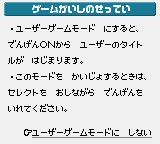
With the mode on, the cartridge becomes your game. It powers on into your game's opening instead of the title, B there does nothing, and the Game Over and the ending go back to your game's opening rather than to the title. A cartridge given to a friend can open straight on the game you made for them. Hold SELECT while switching on to turn the mode off again, as the page says.
Link and Turbo File#
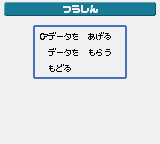
Link つうしん joins two Game Boy Colors by the link cable: Give Data データを あげる on one, Receive Data データを もらう on the other, and Back もどる. The receiver chooses one of ten parts of a game (the title, the heroes, the maps, the messages, the events, the magic, the items, the monsters, the enemy map, or the play saves) and the giver sends it. A whole game is nine sessions. Everything else on the receiving cartridge stays as it was.
Turbo File ターボファイル uses ASCII's Turbo File GB on the link port: Save セーブ, Load ロード and Delete さくじょ. A save there is the whole cartridge, your game and its play saves together, as one file named RPG TCOOL and a number. Loading replaces everything on the cartridge.
Saving and sharing has both in full.
The controls#
A confirms and B cancels, everywhere.
| Button | In the menus and editors | In a game |
|---|---|---|
| A | Confirm; in a number box, keep the number (pulled back into its range) | Talk to or check what is ahead, across a counter too; on the ship, step onto land; in the airship, land |
| B | Cancel, go back a step | Open and close the command window |
| ↑ ↓ ← → | Move the cursor; in a number box, ↑ ↓ change a digit | Walk; in a room a new direction first only turns the party |
| SELECT | In a number box, put in the largest number allowed; in the message editor, tidy the list (セレクト せいとん) | In test play, open its menu; otherwise nothing |
| START | In a number box, put back the number it had | On the game's title screen, open Continue / From the Start (as A does); in a battle on Auto, stop Auto after the round; in test play, hold it to walk through anything |
| SELECT held at power-on | Turns the user-game mode off | — |
| A + B + SELECT + START | The soft reset: back to the title | The soft reset: back to the title, the editor (from test play) or your game's opening (in the user-game mode); play since the last save is lost |
Every number goes through one box. ↑ and ↓ change a digit, SELECT puts in the largest number the field allows, START puts back the number it had, B cancels, and A keeps it. A number past the field's range is pulled back into it on A: a hero's gain typed as 39 comes back as 30. So the number of digits shown isn't the limit; Limits, bugs and messages has every field's range.
The editor menu#
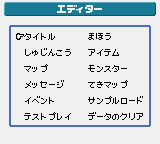
Edit エディット opens the editor menu エディター: twelve entries in two columns, eight editors and four tools. The menu remembers where its cursor was.
 123456789101112
- 1 Title タイトル the game's title, its title screen's picture and song, your name
- 2 Heroes しゅじんこう 8 heroes, then the Party, Vehicle and BGM Settings
- 3 Maps マップ 25 maps built of rooms; Choose the World Map
- 4 Messages メッセージ every message the events show, by map; 4 lines of 16
- 5 Events イベント the events, by map, floor and room
- 6 Test Play テストプレイ plays your game, with test play's tools
- 7 Magic まほう 40 spells, the effect fixed by the slot
- 8 Items アイテム 115 items, the kind fixed by the number
- 9 Monsters モンスター 72 monsters: stats, type, options, treasure
- 10 Enemy Map てきマップ which monsters appear in each area of the world map and on each floor
- 11 Sample Load サンプルロード loads NOBLE CAT into the editors, over everything but the play saves
- 12 Clear Data データのクリア empties one part, a play save, or the whole game
The editors open on lists, a few records to a page; A opens a record, and its fields are picked from lists or typed in number boxes and on the keyboard. The chapters after this one go through them: The database (Title, Heroes, Magic, Items, Monsters), Maps and the world (Maps, Enemy Map), Events and Messages and text.
The S button#
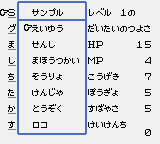
Most editor pages have an S at the top left. It opens a short list of sample presets; pick one and the page asks 「このデータを ロード?」, "Load this data?":
- Magic, Items, Monsters and Maps offer the sample game's record of the same number: the sample's spell 12 for your spell 12, its map 1 (with its floors and rooms) for your map 1.
- Heroes offers six classes, hero えいゆう, warrior せんし, mage まほうつかい, priest そうりょ, sage けんじゃ and thief とうぞく, and then the sample's own hero. A class sets only the four gains, how much the hero's strength, stamina, wisdom and speed grow a level; the name, the graphic and the spells stay yours. The last entry copies the sample's hero of the same number whole: name, graphic, levels, gains and spells.
The Title, Messages, Events and Enemy Map pages have no S. The database lists the classes' gains.
Typing names#
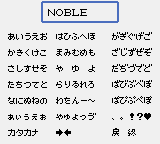
Names, the title and the messages are typed on one keyboard: the hiragana in rows, the small kana and the marks below them, and カタカナ at the bottom left to turn to the katakana. Typing inserts until the field is full, then overwrites the last place. The characters are what the font has: kana, capital letters, digits and a handful of marks, and no kanji, so a game in English is possible in capitals. Messages and text has the keyboard and the character set in full.
| Name | Characters |
|---|---|
| The game's title | 2 lines of 8, in the large title font |
| Your name (the author's) | 16 |
| A hero | 5 |
| A spell, an item, a monster, a map | 6 |
| A message | 4 lines of 16 |
The sample game#
The ROM holds a complete sample game: NOBLE CAT, credited to アスキー・ケイアイディア. Its heroes are ロコ (Roko), ニーナ (Nina), ねこニーナ (Neko-Nina) and ガレー (Garē). It is a short adventure over a world of castles, towns and dungeons, and its first scene asks the player to name the hero. The sample game NOBLE CAT tells it, with its maps.
The sample is on the cartridge twice over:
- Sample on the title plays it straight from the ROM, whatever is in the editors.
- Sample Load サンプルロード on the editor menu copies it into the editors, as ordinary data to study or build on.
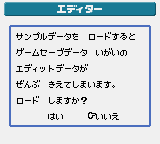
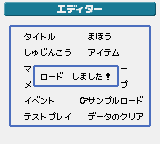
Sample Load replaces your game. It warns first, 「サンプルデータを ロードすると ゲームセーブデータ いがいの エディットデータが ぜんぶ きえてしまいます。」: "loading the sample data erases all the edit data except the game save data". Yes はい loads it and says 「ロード しました!」, loaded. The three play saves are kept. To take only a part of the sample, use the S button on the pages you want instead.
Play the sample before you start your own. Then load it and open it in the editors, to see how its doors, shops, inns and story are built (Events).
Clear Data#
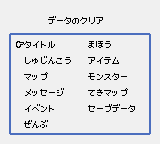
Clear Data データのクリア puts a part of the game back as the blank project has it, or empties a play save. It asks 「ほんとうに けしますか?」, "really erase?", and says 「データを けしました!」, erased, after.
| Choice | Japanese | What goes back to the blank project's |
|---|---|---|
| Title | タイトル | The title, your name, the title screen's picture and song |
| Heroes | しゅじんこう | The eight heroes and the start settings (party, gold, start place, vehicles, BGM) |
| Maps | マップ | The 25 maps, their floors and rooms, and the world-map choice |
| Messages | メッセージ | Every message, the common ones too |
| Events | イベント | Every event, the world map's places and the chests |
| Magic | まほう | The 40 spells |
| Items | アイテム | The 115 items |
| Monsters | モンスター | The 72 monsters |
| Enemy Map | てきマップ | The troops of the world map's areas and the maps' floors |
| Save data | セーブデータ | One play save, emptied |
| All | ぜんぶ | All of the above, the three play saves included |
Test play#
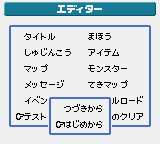
Test Play テストプレイ plays your game as it stands, from Continue つづきから or From the Start はじめから. It has tools of its own, which no screen of the cartridge mentions:
- hold START while walking to go through walls, sea and mountains, fast;
- SELECT opens a menu: back to the editor, battles normal, won at once or none, and the switches 1–100 to turn on and off;
- A + B + SELECT + START goes back to the editor.
A battle lost in test play doesn't end the game (by the code), and its saves are tagged テスト. Playing a game has the details.
Keeping your game safe#
The cartridge keeps the whole project in 32 KiB of battery-backed memory, in parts that each carry a checksum. Two things erase it:
- A lost signature formats the cartridge silently at power-on. It happens to a cartridge whose battery has run flat, and to one whose six-byte signature has been damaged.
- A part that fails its checksum, when the program next reads it, brings up the broken-data message, and A formats everything. The program checks only what it reads, so a damaged cartridge may seem fine for a while, until an editor or a game reaches the damaged part.
Normal use never sets either off, because every save rewrites its part's checksum. What does is switching off while the cartridge is writing, a failing battery or dirty contacts. So:
- Don't touch the power while a save is being written, in an editor or in play.
- Copy the save of a second-hand cartridge before its first power-on, with a cartridge reader. Neither the format nor the broken-data message can be refused once the cartridge is on.
- Keep a backup: the whole cartridge on a Turbo File GB, your game on a friend's cartridge by Link, or a copy of the save file in an emulator.
The cartridge this study used holds no game in its save (Behind the scenes).
The soft reset#
Hold A + B + SELECT + START together to reset. From a game it goes back to the title, from test play to the editor, and from your game in the user-game mode to your game's opening. Nothing is saved. It works anywhere but the Link page.
An order of work#
The editors depend on each other. A hero learns spells from the Magic list and equips items from the Items list; an event shows messages and gives items by their numbers; the enemy map needs both maps and monsters. A workable order:
- Play NOBLE CAT, then load it with Sample Load and look at it in each editor.
- Choose a start: build on the sample, or Clear Data → All and take back single records with the S button.
- Title: the title, the title screen's picture and song, your name.
- Magic and Items: name the spells (each slot's effect is fixed) and the weapons, armour, potions and keys (each number's kind is fixed).
- Heroes: names, graphics, the levels they learn each spell at, start levels and gains (the S classes fill the gains in). Then the Party, Vehicle and BGM Settings: who starts, with how much gold, where, and the songs of each kind of place.
- Maps: first Choose the World Map, then each map's floors and rooms, and the stairs between floors.
- Monsters, then the Enemy Map: who appears in each area of the world map and on each floor.
- Messages and Events: the doors and places that join the world map to the maps first, then the people, shops, inns, chests and the story, held together by switches.
- Test Play after each step.
Fan-made reference material, one of the Eschaton Games Tsukuru guides. Not affiliated with the publishers of the titles it covers. Corrections and questions: contact@eschaton.games.